You posted a great before-and-after photo.
People liked it. Maybe a few commented. You even picked up some extra views.
Success, right? Maybe.
There’s another social media metric local businesses should be thinking about:
Would anyone save your post?
That question can completely change the kind of content you create.
Because getting someone’s attention today is good.
Creating something they’ll want to find again three months from now may be even better.
That’s what’s called the Social Media Save Test.
Before you publish your next post, ask:
Does this give my potential customer something useful enough to save for later?
If the answer is yes, you may have created more than social media content. You’ve created a small marketing asset.
Quick Outline …
Likes Are Nice. Being Remembered Is Better.
Most businesses judge social media posts by what happens immediately.
Did it get likes?
Did someone comment?
Did the photo get attention?
Those things matter. But they don’t tell the whole story.
Imagine you’re a kitchen remodeler.
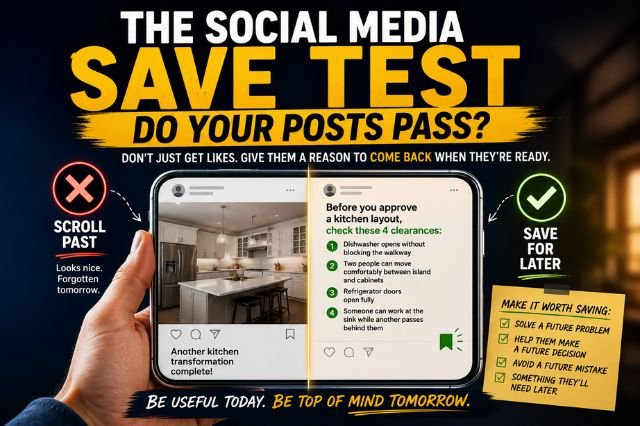
You post a beautiful completed kitchen with this caption:
Another kitchen transformation complete! We love how this project turned out.
Nothing wrong with that.
But what does the homeowner do with it?
Probably look at it for a few seconds and keep scrolling.
Now take the same kitchen and create this post:
Before approving your new kitchen layout, check these four things:
- Can the dishwasher open without blocking the walkway?
- Is there enough room for two people around the island?
- Can the refrigerator doors open completely?
- Can someone use the sink while another person walks behind them?
Same project.
Completely different value.
The first post shows people what you did.
The second shows them what you know.
And that’s much more likely to get saved.
What Makes Someone Save a Social Media Post?
People usually save content because they think:
“I’m going to need this later.”
That’s the opportunity.
A homeowner may discover your business months before they’re ready to call.
Maybe they’re researching a bathroom remodel.
Planning a new deck.
Comparing roofing materials.
Thinking about replacing their HVAC system.
They’re interested—but they’re not ready.
Give them useful information now, and you give them a reason to keep your business within reach.
Attention gets you noticed. Utility gives people a reason to remember you.
Give Customers Something They Can Use
The easiest way to create save-worthy content is to stop thinking only about what you want to promote.
Think about what your customer will eventually need to decide.
A flooring company could post:
Luxury vinyl plank is a popular choice for busy homes.
That’s information.
But consider this instead:
Before choosing flooring, ask what the floor actually has to survive.
- Will it regularly get wet?
- Do you have large dogs?
- Will it run through several connected rooms?
- How much visible wear are you comfortable with?
Now you’ve given the homeowner a simple way to evaluate flooring.
They can use those questions at the showroom next month.
That’s a reason to hit Save.
Teach the Decision, Not Just the Answer
This is where local businesses can create especially strong content. You don’t always have to tell people which option is best. Teach them how to decide what’s best.
For example:
Instead of:
“Quartz countertops are a great choice.”
Try:
“Quartz vs. natural stone: Ask these three questions before choosing your countertop.”
Instead of:
“Hire an experienced remodeling contractor.”
Try:
“Ask these five questions before comparing two remodeling estimates.”
Instead of:
“Have your HVAC system serviced regularly.”
Try:
“Four warning signs your AC problem may be more than a dirty filter.”
See the difference?
One gives advice.
The other gives the reader something they can actually use.
Build Content Around Future Moments
Here’s another way to approach your social media planning.
Don’t ask:
“What should we post this week?”
Ask:
“What might one of our customers need help figuring out three months from now?”
For a remodeling contractor, that might be:
Before the first consultation: “7 questions to answer before meeting with a kitchen remodeler.”
While comparing estimates: “Don’t compare remodeling bids until you’ve checked these five things.”
During design: “Three kitchen decisions that are much cheaper to change before demolition.”
Before construction: “What homeowners should remove, photograph and confirm before demolition day.”
Other home-service businesses can do exactly the same thing.
A roofer might create:
“5 photos to take after a major storm before calling a roofer.”
An HVAC contractor:
“Save this checklist before turning on your heat for the first time this fall.”
A plumber:
“Know where these three shutoffs are before you have a plumbing emergency.”
A landscaper:
“Save this spring planting timeline for your Georgia yard.”
Each post has a clear future moment when the customer might need it.
That’s what makes it save-worthy.
Turn Your Social Feed Into a Resource
There’s another benefit to this approach. It demonstrates expertise without constantly telling people how experienced you are.
Anyone can post:
“We provide quality service.”
Useful content proves it.
When you consistently explain problems, choices, tradeoffs and mistakes, potential customers start seeing how you think.
And without saying it directly, you’re answering a much bigger question:
“What would it be like to have this company helping me?”
That’s valuable marketing.
You’re building trust before someone ever requests an estimate.
Put Your Next Post Through the Social Media Save Test
Before you hit Publish, ask four questions:
What future decision will this help my customer make?
What mistake could this help them avoid?
Have I given them a checklist, comparison, warning, question or rule they’ll want later?
And most importantly:
Can they picture when they’ll need this information again?
If they can, your post passes the Social Media Save Test.
You’re no longer creating something that simply stops the scroll.
You’re creating something worth keeping.
And when that customer finally needs a contractor or home-service professional, your business may already be sitting there in their saved posts—waiting to be found again.
Here’s a Prompt to Get You Started …
Use the AI you’re already using: ChatGPT, Claude, Gemini, Grok, Meta AI, Copilot, or another general-purpose AI assistant.
Using the prompt below, replace the example information inside the brackets with your own information – it could be a short idea or a complete blog post. Then copy and paste the complete prompt into your AI.
Prompt:
Analyze this social media post using the Social Media Save Test:

[PASTE OR DESCRIBE YOUR POST HERE, for example: “We just finished this beautiful kitchen remodel in Marietta. The homeowners chose white cabinets, quartz countertops, and a large island. We love how it turned out!”].

Determine whether a potential customer would have a strong reason to save this post and return to it later. Focus specifically on future usefulness, not likes, comments, entertainment value, or how attractive the post might be. Identify the future decision, problem, mistake, question, comparison, warning, checklist, or decision rule the post currently helps with, if any. Then give it a Save Test score from 1 to 10 and briefly explain the biggest reason for that score. If the post scores below 8, identify the single best opportunity to make it more useful without changing its core subject, then rewrite only as much as necessary to turn it into a save-worthy post. The improved version should give the reader something practical they can carry forward and make it easy to picture the exact future moment when they'll want to return to it. Don't invent facts, prices, results, credentials, or details that weren't provided. Finish by stating in one sentence why someone would save the improved post.
AI Makes Social Media Easier—But You Still Need to Show Up
AI tools won’t do everything. But they will help you do it faster, better, and with less frustration.
So, if you’re a business owner in Marietta, East Cobb, or Kennesaw who just wants better social media results—AI can certainly help.
And if you want us to handle all of it? Let’s talk.
We help local businesses win with social media, AI and SEO, without all the geek stuff.